








One of the most consistent challenges across integration platforms is the tendency to overengineer APIs that are, at their core, simple data access operations. They are not complex orchestration workflows. They are not event-driven architectures. They are not long-running business processes. They are usually requests like:
- “Give me a list of customers.”
- “Fetch order by ID.”
- “Insert a new application record.”
- “Allow filtering and paging.”
And yet, what I often see in enterprise environments is something like this:
A simple SELECT query turns into:
 By the time the API goes live, we have built an entire integration stack just to return a few rows from a database.
This is exactly the type of problem SQL Data API Builder (DAB) solves.
It removes unnecessary layers and lets integration teams expose SQL data quickly, securely, and with governance.
What Is SQL Data API Builder?
SQL Data API Builder (DAB) is a lightweight, open-source, configuration-based engine that automatically generates REST and/or GraphQL APIs over:
- Azure SQL Database
- SQL Server (on-prem or VM)
- Azure SQL Managed Instance
- Azure Cosmos DB
- PostgreSQL
- MySQL
It uses a declarative JSON/YAML configuration and handles:
- CRUD operations
- Pagination
- Filtering
- Ordering
- Sorting
- Column Selection
- Authentication (Azure AD)
- Row-level security
- Stored procedure execution
- Entity-level permissions
No .NET project.
No controllers.
No ORM.No API Boilerplate.
No deployments other than the container or App Service running DAB.
It’s essentially: A secure, Azure AD–protected API layer for SQL that you can provision in minutes.
DAB is not meant to replace your integration stack. It’s meant to remove unnecessary weight from it.
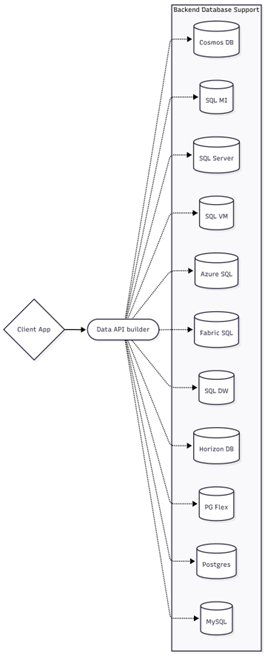
Image 1: Database support for DATA API Builder
Where SQL DAB Fits in Azure Integration Architecture
Here’s the typical pattern Azure Integration teams use today:

With SQL Data API Builder, the structure becomes:

You still keep APIM for governance, but you eliminate the boilerplate API layer. In enterprise environments, APIM exists for:
- Centralised security enforcement
- OAuth/JWT validation
- Throttling & rate limiting
- IP restrictions and network control
- API versioning
- Monitoring and analytics
- Standardised policies
Real-World Integration Scenarios Where DAB Excels
Scenario 1: Read-Only APIs for Reporting & Analytics
Problems
Reporting tools need SQL data
Business intelligence platforms such as Power BI, internal dashboards, partner portals, and analytics services frequently need access to operational data stored in SQL databases. This data powers reporting, decision-making, and operational insights across the organisation.
However, most of these tools cannot safely connect directly to production databases, especially when accessed outside the trusted network or by external consumers.
Direct SQL access is blocked for security
Enterprise security policies typically prevent direct database access for good reason. Granting SQL credentials to reporting tools or external systems can introduce several risks:
- Exposure of database credentials
- Uncontrolled queries that impact production performance
- Lack of centralised access control and monitoring
- Difficulty enforcing row-level security policies
Because of these risks, most organisations require all data access to flow through secured APIs with authentication, authorisation, and monitoring.
Building APIs just for SELECT queries feels wasteful
To comply with the security requirements, engineering teams often build custom APIs or Azure Functions simply to return rows from a database.
That typically involves:
- Creating an Azure Function or Web API project
- Writing controllers and service layers
- Implementing pagination and filtering logic
- Managing authentication and authorisation
- Deploying and maintaining infrastructure
For APIs that only execute simple SELECT queries, this becomes repetitive engineering work that consumes time and adds unnecessary complexity to the architecture.
Solution with DAB
SQL Data API Builder removes the need to build custom API code or Azure Function for these simple data access scenarios. Instead of writing controllers and database queries, developers define which tables or views should be exposed using a configuration file. DAB automatically generates secure REST endpoints that allow reporting tools and dashboards to query the database safely.
Key capabilities include:
- Expose read-only REST endpoints for selected tables or views
- Restrict operations to SELECT only, preventing modifications to data
- Authenticate using Microsoft Entra ID (Azure AD) for secure access control
- Integrate with Azure API Management for governance, throttling, and monitoring
This allows organisations to provide controlled access to SQL data without building a custom backend API.
Benefits
Zero backend code: Developers do not need to build controllers, service layers, or ORM logic just to expose SQL data. This significantly reduces development time and maintenance overhead.
No SQL credentials shared: Consumers authenticate using Azure AD rather than database credentials, improving security and reducing the risk of credential exposure.
Easy APIM throttling and governance: By placing DAB behind Azure API Management, organisations can apply rate limiting, monitoring, versioning, and policy enforcement without building these capabilities into custom APIs.
SQL performance stays controlled: Because access is managed through API endpoints with filtering, pagination, and controlled queries, database performance remains predictable and protected from uncontrolled reporting queries.
Scenario 2: Backend-for-Frontend (BFF) for Low-Code Apps
Problem
Power Apps / Logic Apps need CRUD access
Low-code platforms such as Power Apps and Logic Apps are increasingly used to build internal business applications quickly. These apps often require CRUD access to operational data stored in SQL databases for tasks such as:
- Managing customer records
- Updating application status
- Submitting forms and workflows
- Retrieving lookup data
While these platforms make development faster, they still require a reliable and secure way to access backend data.
SQL connectors expose too much and lack governance
The default approach is often to connect Power Apps or Logic Apps directly to a database using built-in SQL connectors. While convenient, this approach introduces several enterprise challenges:
- The connector often exposes entire tables instead of controlled datasets
- Security policies become difficult to enforce consistently
- Row-level or entity-level access control is harder to implement
- Query patterns from low-code tools can become unpredictable
In large organisations, allowing multiple low-code apps to connect directly to databases can create data access sprawl, making governance and auditing extremely difficult.
You want central API control
Enterprise architecture teams typically prefer all data access to flow through a centralised API layer. This provides:
- Standardised security policies
- Controlled data contracts
- Observability and monitoring
- Governance over how data is accessed and consumed
However, building and maintaining custom APIs for every dataset required by low-code applications quickly becomes a bottleneck for engineering teams.
Solution with DAB
SQL Data API Builder provides a lightweight Backend-for-Frontend (BFF) layer for low-code platforms. Instead of connecting Power Apps or Logic Apps directly to the database, DAB exposes only the specific entities required by the application through secure REST endpoints.
For example, you can configure DAB to expose only:
- /api/customers
- /api/orders
- /api/application-status
This ensures the low-code application interacts with a controlled API surface rather than the entire database.
When placed behind Azure API Management, additional enterprise governance capabilities can be applied, such as:
- Rate limiting to protect backend systems from excessive calls
- Caching to improve performance for frequently requested data
- Transformation policies to reshape payloads if required
- Token validation using Microsoft Entra ID for secure authentication
This creates a clean, controlled backend layer that low-code platforms can safely consume.
Benefits
Database hidden from low-code platforms: Power Apps and Logic Apps interact only with the API layer, ensuring the underlying database structure remains protected and inaccessible.
Enforced API contracts: By exposing only selected entities and fields, organisations maintain strong control over how data is accessed and ensure consistent API contracts across applications.
No connector sprawl: Instead of multiple applications creating direct database connections, all access flows through a centralised API layer, simplifying governance and reducing architectural complexity.
Auditable and governed access: When APIs are exposed through Azure API Management, organisations gain full visibility into usage patterns, authentication events, and API consumption – enabling stronger compliance and monitoring.
Scenario 3: Micro-Integrations Without Azure Functions
Problem
Many integrations are simple data lookups
In enterprise systems, a large number of integration requests are extremely lightweight. They are not complex workflows or event-driven processes – they are simple queries such as:
- “Get customer by ID”
- “List recent invoices”
- “Check if an entity exists”
- “Return lookup value by code”
These endpoints are often used by other microservices, web applications, partner APIs, or internal tools that just need quick access to a specific dataset.
Using Azure Functions for these scenarios can feel heavy
The typical approach in Azure environments is to build an Azure Function or small API service to expose these operations.
While Functions are powerful, this approach introduces several layers of overhead for what a single SQL query is essentially:
- Creating a .NET project and writing controller logic
- Implementing database access and mapping code
- Managing deployment pipelines and infrastructure
- Handling authentication and authorisation
- Monitoring logs and application performance
For integrations that simply read from a table or view, this becomes unnecessary engineering effort.
Over time, these small APIs accumulate across the platform, creating:
- Dozens of tiny Function apps
- More infrastructure to manage
- Increased operational complexity
- Higher maintenance and monitoring overhead
In large integration landscapes, teams often end up maintaining many small services whose only job is to execute a SELECT query.
Solution with DAB
SQL Data API Builder provides a much lighter way to support these micro-integration scenarios. Instead of creating a Function or custom API, developers simply configure DAB to expose the required table or view.
For example:
- /api/customers/{id}
- /api/invoices
- /api/lookup-codes
Query parameters can be used to apply filtering, sorting, and pagination automatically. This allows applications and services to retrieve the data they need without building or deploying a custom backend service. When combined with Azure API Management, the endpoints can still benefit from enterprise governance features such as authentication, throttling, and monitoring. In effect, DAB becomes a lightweight data access layer that supports simple integration patterns without introducing unnecessary infrastructure.
Benefits
No Azure Function or Logic App required: Simple data lookups can be handled directly by DAB without provisioning additional compute resources or services.
No backend code to maintain: There is no need to write controllers, service layers, or database access logic for simple queries, reducing development and maintenance effort.
No cold start latency: Unlike serverless compute services that may experience cold start delays, DAB responds immediately since it operates as a lightweight API layer over the database.
Direct SQL performance: Queries are executed directly against the database with minimal overhead, ensuring efficient data retrieval while still maintaining security and governance through the API layer.
Scenario 4: Legacy SQL Modernisation Without a Rewrite
Problem
Many organisations still rely on legacy SQL systems
One of the most common situations I encounter in enterprise environments is a business-critical SQL database that has been running for 10–15 years. It might power student systems, finance systems, HR applications, or operational workloads. The schema is stable. The data is reliable.
But there is one big problem:
There is no API layer.
New applications want to access the data, but the only way to do that is by:
- connecting directly to the database
- exporting CSV files
- building tightly coupled integrations
Rewriting the system is rarely an option. These systems often support core business processes, and the cost of rebuilding them is huge.
What organisations actually need is a way to wrap the existing database with modern APIs without touching the underlying system.
No API layer exists
Many legacy systems were built before API-first architectures became common. As a result, external systems must either:
- Connect directly to the database
- Rely on manual data exports
- Use tightly coupled integrations
Direct database access creates several enterprise challenges:
- Security risks from exposing database credentials
- Tight coupling between systems and database schemas
- Limited governance and monitoring of data access
- Difficulty supporting modern applications such as mobile apps, SaaS platforms, or partner integrations
To modernise these environments, organisations typically want to introduce an API layer.
There is no budget or appetite for a full rewrite
Rebuilding a legacy application to introduce modern APIs is often expensive and risky.
A full rewrite may involve:
- Redesigning the data model
- Rewriting business logic
- Migrating applications and integrations
- Running parallel systems during migration
These projects can take months or even years and may disrupt existing operations.
For many organisations, the goal is not to replace the legacy system immediately, but to modernise access to it gradually.
Solution with DAB
SQL Data API Builder provides a lightweight way to introduce an API layer over existing SQL databases without modifying the underlying schema. With a simple configuration file, you can map legacy tables or views and expose them through REST or GraphQL endpoints.
For example:
- /api/customers
- /api/orders
- /api/products
DAB handles:
- Query filtering and pagination
- Authentication via Microsoft Entra ID
- Role-based access controls
- Secure API exposure
These APIs can then be placed behind Azure API Management to provide enterprise governance features such as rate limiting, monitoring, and versioning.
This approach allows organisations to wrap legacy databases with modern APIs, enabling new applications and integrations without touching the underlying system.
Benefits
Legacy system uplift without disruption: Existing databases can continue running unchanged while new applications consume the data through secure APIs.
Faster modernisation timelines: Instead of large-scale rewrite projects, organisations can modernise incrementally by introducing APIs around legacy systems.
Reduced refactoring cost and risk: Because the database schema does not need to be redesigned, teams avoid the cost and operational risk associated with large refactoring efforts.
Enables gradual migration strategies: New services, microservices, or cloud-native applications can begin consuming APIs immediately while the legacy system continues to operate in the background.
Improves governance and security: By exposing data through APIs rather than direct database access, organisations gain better control over authentication, monitoring, and usage policies.
Why Azure Integration Developers Should Care
From an architect’s perspective, SQL Data API Builder fills a gap that has existed for a long time.
Not every API need:
- an Azure Function
- a full .NET service
- or a Logic App workflow
Sometimes you simply need a secure way to expose SQL data.
In the projects I’ve seen, DAB becomes extremely valuable when teams start asking questions like:
- “Do we really need a Function for this endpoint?”
- “Why are we writing code just to return a table?”
- “Can we expose this safely without building another microservice?”
That’s when DAB starts making a lot of sense.
It won’t replace your integration stack. But it removes unnecessary work from it.
And in modern integration platforms, reducing unnecessary complexity is often the biggest win.
For integration teams, it’s a productivity multiplier, not a silver bullet. Avoid DAB when:
- You have complex business logic. Use Functions or .NET APIs.
- You need cross-service orchestration. Use Logic Apps.
- You need event-driven flows. Use Event Grid / Service Bus.
- You require heavily shaped response models. Use an API layer with transformations.
SQL Data API Builder gives Azure teams a faster, lighter way to expose data securely without building unnecessary API layers. By combining DAB with Azure API Management, organisations keep enterprise governance while dramatically reducing development time, complexity, and operational overhead.