










The world is evolving and so is the AI ecosystem; single-purpose-built agents can only perform one task well, thus providing value within narrow boundaries, such as retrieving specific data or running predefined operations. However, real-world issues require systems that can think, act, and collaborate seamlessly. This is where Solace Agent Mesh excels, streamlining how AI agents work collaboratively to deliver intelligent, scalable results across business and enterprise environments.
In this blog, readers will learn what Solace Agent Mesh is and how they can easily build their first project. Further, how to add agents and create a workflow by showing a practical example using an IT ticket workflow scenario, demonstrating how Solace Agent Mesh can retrieve high-priority tickets and provide troubleshooting steps from the knowledge base. This pattern helps enterprises reduce IT resolution times, eliminate manual triage, and improve operational efficiency across IT support environments.
What Is AI Agent Orchestration?
AI Agent Orchestration can be described as more than one agent collaborating, coordinating, and managing multi-step tasks that are not achievable through a single agent, as agents are task-specific. Typically, there is one Orchestrator Agent which delegates the task to other agents based on the task provided to the user.
Introducing Solace Agent Mesh
Solace Agent Mesh is an open-source framework that allows multi-agent orchestration at scale. The framework combines the power of Google’s Agent Development Kit with Solace’s event-driven messaging platform, creating a robust foundation for multi-agent AI systems.

Image 1: Architecture overview of Agent Mesh
Solace Agent Mesh approaches AI agent orchestration using an event-driven, loosely coupled architecture. An Orchestrator Agent interprets user intent and delegates tasks to specialised agents via asynchronous messaging, allowing agents to collaborate, scale independently, and execute tasks in parallel. This design improves resilience, flexibility, and scalability, making it ideal for enterprise-grade multi-agent workflows.
Solace’s event-driven Architecture ensures:
- Mult-step task execution can be performed in parallel by Agents.
- Workflows are fault-tolerant; errors in one Agent do not break the whole workflow.
- A horizontal scaling approach so developers can add and remove Agents with few configuration changes, and to support increasing workloads.
Getting Started with Solace Agent Mesh
Solace has made it easy to set up your first project and get comfortable. To start with Solace Agent Mesh, Python version 3.10.16 or later is needed, plus access to one of the AI service providers. Then follow the steps below:
- Install the Solace Agent Mesh package – this can be easily done using the Python package manager pip. Run the command “pip install solace-agent-mesh” to install Solace Agent Mesh. It is recommended that a Python virtual environment be created before installing the required packages for the project.
- Once the package is installed, start setting up the project through the terminal or the GUI, However, it is recommended to set up the project through the GUI for the first time by running the command “sam init –gui.”
- Sam is shorthand for Solace Agent Mesh. This opens the project initialization window in the web browser and choose “Get Started Quickly” then continue.
- On the next page, configure the AI service provider. In this project, the Azure OpenAI GPT-4o mini model is used. Once the connection is successful, you will have the choice to initialize the project. This will set up the directory and configuration files for the project.
Video 1: Solace Agent Mesh: Setup and Initialisation
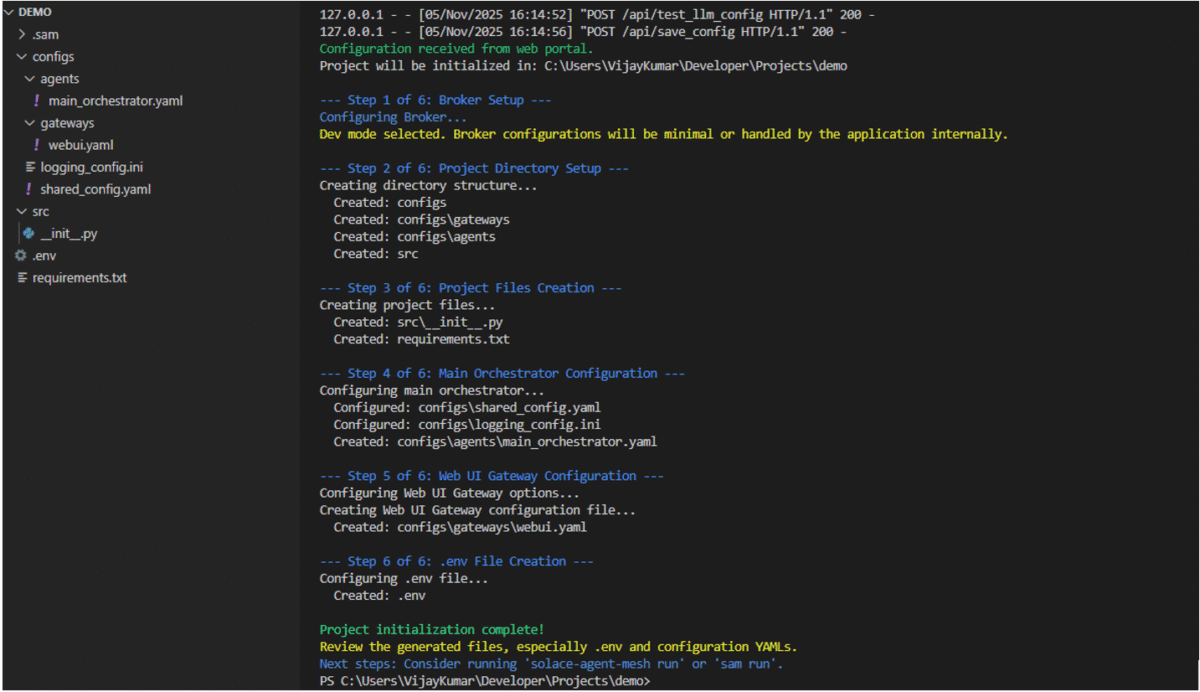
Image 2: Project initialised and directories set up
At this stage, you will only have Orchestrator Agent setup and configured to interact with Orchestrator agent run command sam run in the terminal to open the web UI chat interface.
Video 2: Initial interaction with Orchestrator Agent
Defining Agent Configurations with YAML file
Agent configuration is managed through a YAML files in SAM. Each Agent has its own YAML file, which describes the key attributes, connection parameters, operational behaviours, and other configurations. The code snippet below is of the Orchestrator agent configuration in a YAML file. This declarative approach simplifies setup and ensures consistency across environments and making it an ideal format for managing distributed agents at scale.
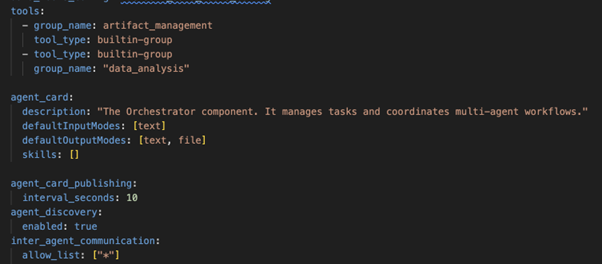
Image 3: Orchestrator Agent – Agent card and tools configuration
Real-World Example: IT Ticket Workflow
Solace provides a variety of out-of-the-box Agent Plugins to get you started. For the IT ticket workflow, MongoDB and the Rag Agent plugins are used. Agents can be added or removed dynamically through CLI. Since agents are loosely coupled, this feature of SAM makes it highly scalable. As a best practice, use a .env file to store configuration variables separately from your codebase instead of hardcoding them. The IT ticket workflow uses two Agents:
- Ticket Agent: This agent is responsible for interacting with the MongoDB and can perform all the CRUD operations. In the demo, the Orchestrator agent was prompted to retrieve high-priority tickets. The task was then delegated to the IT Ticket agent, who queried the MongoDB collection and requested the agent to fetch the high-priority tickets. Add the MongoDB plugin to your Agent Mesh project by running the command sam plugin add <your-agent-name> –plugin sam-mongodb. This would create a YAML file at configs/agents/your-agent-name.yaml for agent configuration.
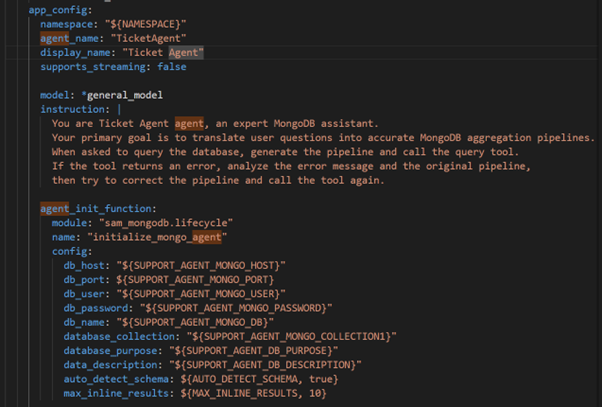
Image 4: Solution Agent – MongoDB Database setup
- Solution Agent: This agent offers troubleshooting steps for the issues. When an agent receives the request, it performs a semantic search over the vector embeddings stored in Qdrant DB. The agent performs the similarity check on the DB and retrieves the result. Further, the agent can ingest documents through the chat interface or the local configured path in the agent configs; files can be added to configured path for real time ingestion, cloud drive options are also available such Google Drive, etc. To add the RAG based agent to your Agent Mesh project, run the following command sam plugin add <your agent-name> –plugin sam-rag and you guessed it right– a file will be created for agent configuration like above in MongoDB plugin.
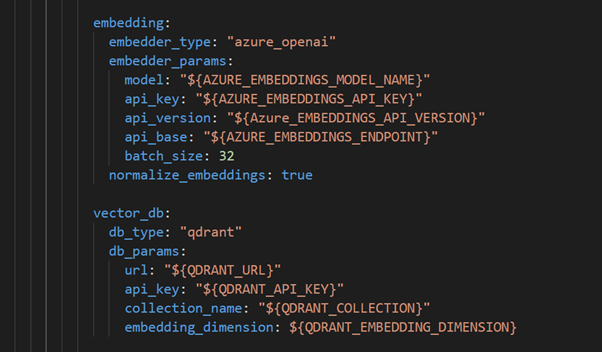
Image 5: Solution Agent – Embedding Model and Vector Database Setup
MongoDB and QdrantDB servers are both running locally as Docker containers, using their official images pulled directly from Docker Hub. MongoDB is used for storing ticket data on the other hand QdrantDB stores the data in vector embeddings for semantic search. Each database servers runs isolated in its own container and only exposes the required ports for local development and integration with AI agents.This container-based setup is straightforward, and you don’t have to worry about manual installs or complex configuration. Additionally, install MongoDB Compass to interact with MongoDB locally and create database and collection as per your requirement, for QdrantDB it provides Web UI, no additional install required just navigate to http://localhost:6333/dashboard and Qdrant DB dashboard would be shown.

Image 6: MongoDB and QdrantDB running in Docker containers
Agent Validation: SAM allows for validating each agent’s configuration. This enables developers to catch the issues earlier and ensures that the agent configuration adheres to the expected schema, includes all required fields, and references valid resources. Agent configuration can be validated by running command sam .\configs\agents\solution-agent.yaml
Once agents are validated, run the project by entering the command “sam run” this will run a local web server and navigate to http://localhost:8000/ to interact with the Agent through the Web UI.
See It Working
Video 3: IT ticket multi-step agent workflow
You can see agents and their information by clicking on the Agents tab in the form of Agent cards. These cards are quite important as they describe the role of an agent; these cards play a crucial role when the Orchestrator agent delegates tasks to other agents.
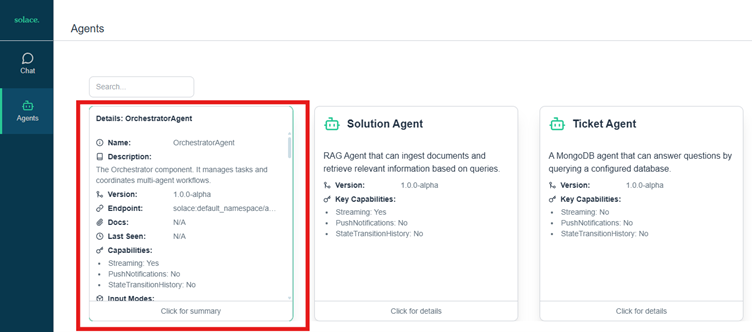
Image 7: Agent card view in Solace Agent Mesh
Conclusion
Solace’s integration-first and independent Agents approach makes it unique when compared to AI-enabled workflows offered by other vendors where AI agents are tightly coupled to their services and orchestration is often workflow-driven, synchronous, and constrained by platform-specific services.
In contrast, Solace Agent Mesh treats agents as independent, loosely coupled components that collaborate through events rather than rigid process flows. Together, it brings the power of multi-agent orchestration in a way that is accessible, scalable, and practical for real-world enterprise workflows. However, Generative AI can produce unexpected/inaccurate results sometimes. In the demo, Generative AI is the base for the Orchestrator agent to interpret user requests and assign the tasks to the appropriate agent. Human oversight is essential, along with proper testing and validation when integrating the Solace Agent Mesh into enterprise environments.
References
https://solacelabs.github.io/solace-agent-mesh/docs/documentation/getting-started/