








Through years of working with various in-house customised B2B EDI systems, it’s common to find that they leave you flying blind, lacking the real-time transparency into document exchange statuses needed to manage critical relationships. This lack of flexibility in tracking complex partner workflows, combined with the ongoing challenges of backend reusability, turns every new connection into a lengthy, tedious task that drains resources and stalls growth.
Anypoint Partner Manager (APM), built on MuleSoft’s Anypoint Platform, modernises B2B integration. It provides a comprehensive solution for IT departments to simplify partner onboarding, automate transaction workflows, and gain actionable insights through monitoring and troubleshooting.
This post will examine how APM modernises B2B integration by enabling reusable data models and providing comprehensive monitoring for EDI transactions via activity logging and real-time alerts.
This blog is designed for Integration Developers, Architects or B2B/EDI Specialists & Administrators looking to either modernise their EDI/B2B Implementation or enter into the EDI/B2B space using Anypoint Partner Manger.
Key Features of Anypoint Partner Manager
Partner Onboarding & Management
- Simplifies technical onboarding of new trading partners
- Centralised configuration for partner profiles, message flows, document types, certificates and communication channels
- Supports small, medium and large partner ecosystems with the ability to scale
Protocol & Transport Support
- Handles multiple transport protocols: AS2, HTTP, HTTPS, SFTP, FTP.
- Ensures secure and reliable data exchange across diverse partner systems.
Message Format Support
- Compatible with a wide range of document formats:
- EDIFACT, X12 UCS, X12 VICS
- CSV, JSON, XML
Transaction Storage, Monitoring & Reporting
- Stores inbound and outbound payloads in a custom storage solution (Azure Blob, Amazon S3, database etc)
- Provides real-time visibility into B2B transactions.
- Tracks and reports on message flows to improve operational efficiency
- Offers dashboards for monitoring workflows
Error Handling & Alerts
- Detects and flags failed and overdue transactions – within pre-built Utilities application
- Provides real-time error notifications and troubleshooting tools to quickly resolve issues
- Replaying of messages in error occurrences or backend requirements
Scalability & Security
- Designed for secure, scalable, and reliable partner integrations
- Ensures compliance with industry standards while supporting growth in partner networks
- Ability to utilise standard security and API Manager security policies
How to best architect a reusable model in APM
One of the biggest advantages of using APM with the downstream MuleSoft Applications is the ability to design a common data model that serves as the backbone for both inbound and outbound transactions. Instead of creating separate mappings for every partner or system, you define your business documents such as orders, invoices, or shipment notices once in their own standardised format. This model becomes the single source of truth, allowing Partner Manager to transform incoming partner‑specific formats (EDI, XML, CSV, JSON, etc.) into the common model for downstream systems, and then reuse that same model to generate outbound messages tailored to each partner’s requirements. The result is a streamlined integration process where upstream and downstream systems speak the same language, reducing duplication, accelerating onboarding, and ensuring data consistency across the entire ecosystem. By reusing the common data model, organisations not only simplify partner connectivity but also create a scalable foundation for future growth.

Image 1: Example of a Basic Architecture Setup – APM <-> Internal ERP System
Deep Dive into the APM Interface
Internal Company Management
Setting up the internal company or business group has a simple centralised interface in APM. The unique features are:
- Company Details (Company name, logo, contact details)
- Payload Storage (inbound and outbound document storage)
- Identifiers (Company Reference, EDIFACT identifiers, X12 identifiers) for transaction identification
- Certificates (Public certificates for secure AS2/HTTPS communication and Identity Key certificates for SFTP authentication)
- Endpoints (inbound and outbound endpoints for the partner)
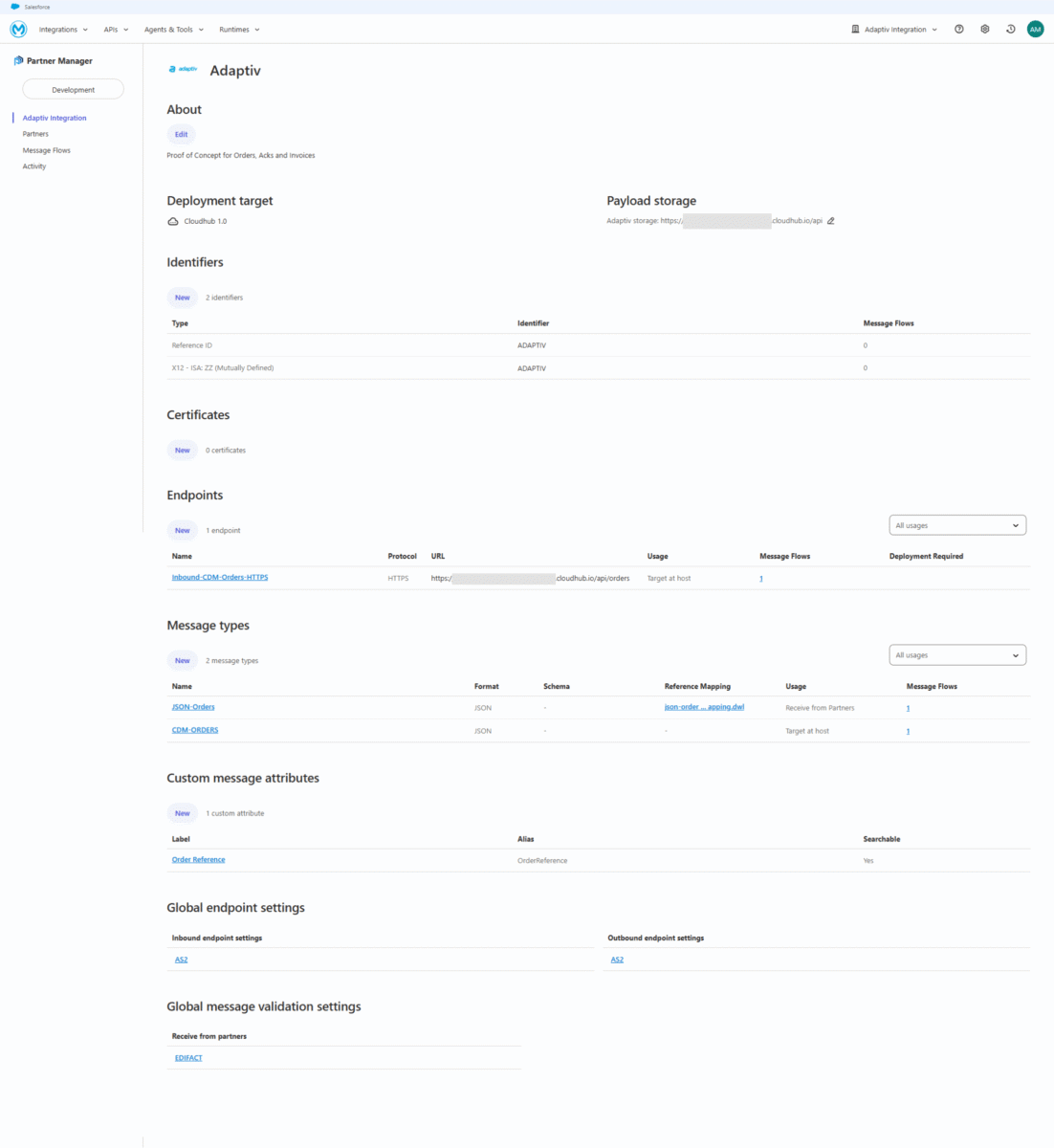
Image 2: Anypoint Partner Manager Internal Business Unit Interface
Partner Onboarding and Management
Likewise, setting up of a partner has a similar approach in APM. This is done without the need for multiple tables or screens in a legacy integration system. The customisable features are:
- Partner Details (Company name, logo, contact details)
- Identifiers (Company Reference, EDIFACT identifiers, X12 identifiers) for transaction identification
- Certificates (Public certificates for secure AS2/HTTPS communication and Identity Key certificates for SFTP authentication)
- Endpoints (inbound and outbound endpoints for the company)
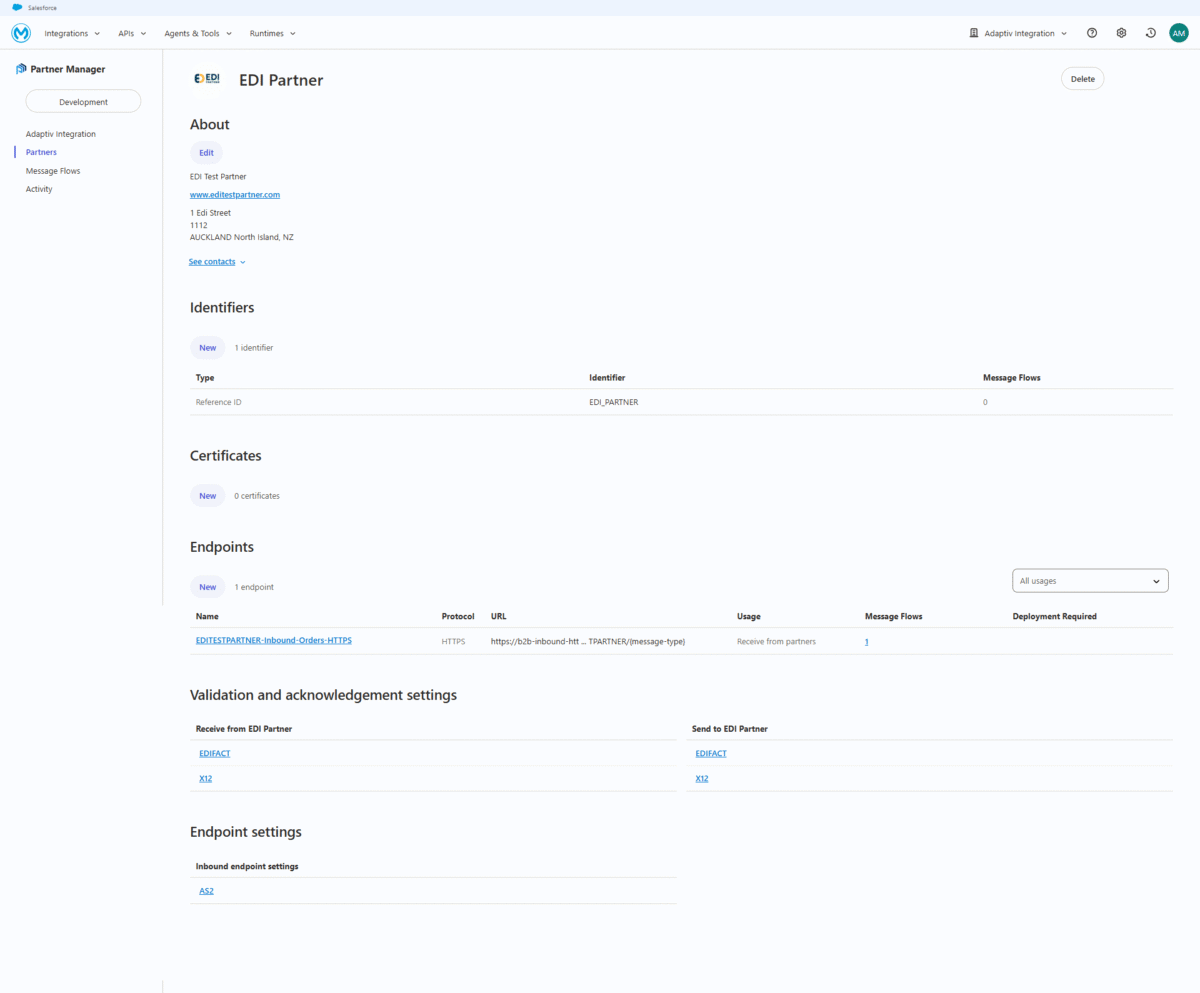
Image 3: Anypoint Manager Partner Interface
Message Flows
Enablement of creating paths for how messages travel between the company and its partner. A message flow consists of the following:
- Inbound Message Source & document type (JSON, CSV, XML, EDIFACT, X12 inbound or outbound)
- Map transform from/to partner format using Dataweave
- Destination & document type (JSON, CSV, XML, EDIFACT, X12 to internal systems or to the external partner)
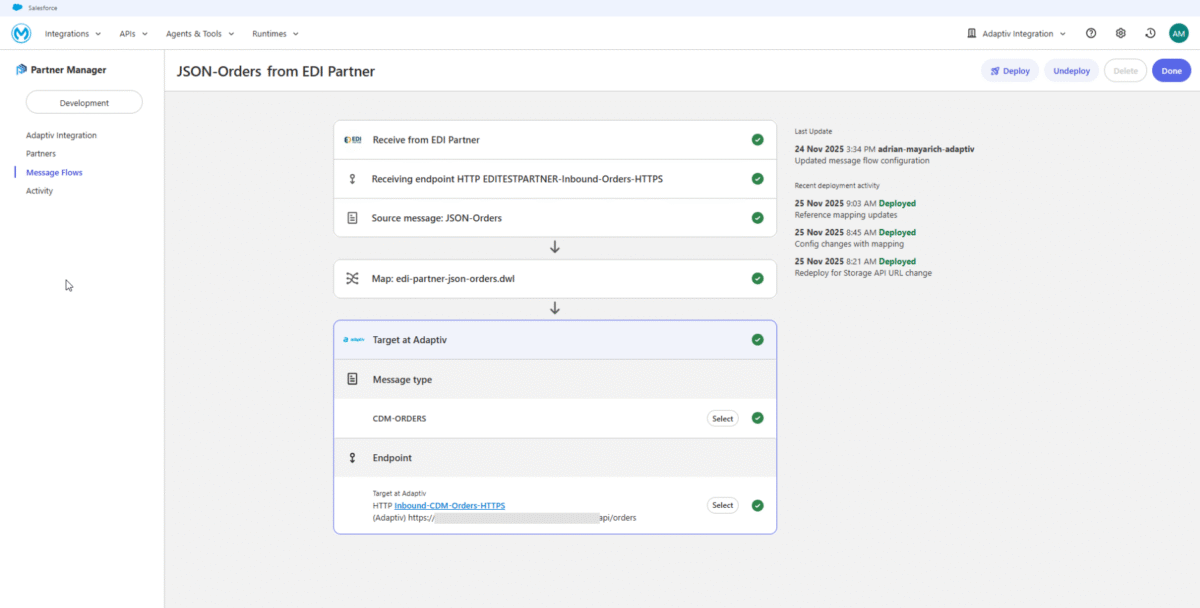
Image 4: Anypoint Partner Manager Workflow Interface
Activity Logs
The activity screen provides all metadata about the transaction including the ability to drill down into the source and destination payloads. This gives a support team all details needed to know from an inbound and outbound transaction before being processed it its respective direction.

Image 5: Anypoint Partner Manager Activity Logs Interface
Transmissions
The Transmission screen provides a detailed view of how a message was processed, making it essential for troubleshooting, auditing and reprocessing. This includes successful, failed and undeliverable messages. The screen includes transmission metadata, delivery statuses and replay functionality. Additionally, a user can select the transmission to drill down further into the activity.

Image 6: Anypoint Partner Manager Transmission Interface
Real-time monitoring and alerts
APM provides real-time visibility and comprehensive error handling that transforms reactive troubleshooting into proactive operational management. The platform’s Activity and Transmission screens (shown above) offer live monitoring of B2B transactions, providing an end-to-end audit trail of every message exchange, delivery status, and any technical or EDI validation error that occurs. This real-time data is critical, and APM enhances it further with the pre-built Utilities application (available in the MuleSoft Exchange).
The alerts can be tailored to any system including but not limited to Slack, Email, Teams or monitoring software such as Splunk.
Conclusion
APM presents a significant jump beyond the traditional EDI systems. It provides a unified, cloud-based solution on the Anypoint Platform. APM not only drastically simplifies partner onboarding and offboarding but also introduces a powerful operational model centered on reusable standards. This approach ensures data consistency across your ecosystem and allows IT teams to rapidly scale their partner network without repetitive mapping work. Coupled with robust, real-time monitoring and error-handling tools like the Utilities application, APM provides the agility, visibility, and control needed to future-proof your B2B integration implementation and maximize the value of your partner ecosystem.
Adaptiv brings proven expertise in implementing Anypoint Partner Manager, with a strong focus on enabling strategic EDI and B2B integrations. Whether your goal is to streamline initial platform adoption, modernise legacy B2B workflows, or establish clear governance and standards, we provide practical guidance to help your team build a sustainable and well-governed integration environment.
References
Anypoint Partner Manager for B2B Integration | MuleSoft Documentation
Setting up the Partner Manager Environment | MuleSoft Documentation
Configuring and Managing a Host Profile | MuleSoft Documentation