
MuleSoft
MuleSoft is an integration platform widely used for connecting applications data and devices. It is well known for its drag-and-drop interface and API-led approach, making it easier to build scalable, reusable integrations. MuleSoft enables organisations to design, build, and manage integrations through a central platform, making it easier to apply structured processes across the entire API lifecycle This appeals to both IT teams and business analysts who need structured data flow without complex development. Some of the key features of MuleSoft include:
-
- Anypoint Platform: A unified platform for designing, deploying, monitoring, and managing APIs and integrations. It supports ITIL Service Design and Configuration Management by providing centralized visibility and control over integration services.
- Drag-and-Drop Interface: MuleSoft offers a visual interface that allows users to map integration workflows with minimal coding. This simplifies updates and aligns with ITIL Change Enablement by enabling controlled and efficient service changes.
- API-Led Architecture: MuleSoft structures integrations using reusable APIs across system, process, and experience layers. This supports ITIL Service Design and Service Portfolio Management by promoting reusable, well-managed services.
- Extensive Connectors: MuleSoft provides hundreds of pre-built connectors for systems such as SAP and AWS. These standardized integrations support ITIL Service Transition by reducing deployment complexity and improving reliability.
- Strong Governance and Monitoring: Built-in security, monitoring, and analytics track integration performance and usage. This aligns with ITIL Service Operation and Continual Improvement by enabling proactive monitoring and ongoing service optimisation.
From an ITIL perspective, MuleSoft supports Service Design and Service Transition by enabling a structured API lifecycle from design through to deployment. Integrations can be documented, tested, and version-controlled before release, ensuring quality and consistency. In large enterprise environments where multiple teams collaborate on API development, maintaining governance and clarity can be challenging. ITIL practices address this by defining clear roles, responsibilities, and approval workflows, ensuring integrations move smoothly from development to production with strong traceability and control while remaining aligned with business objectives.
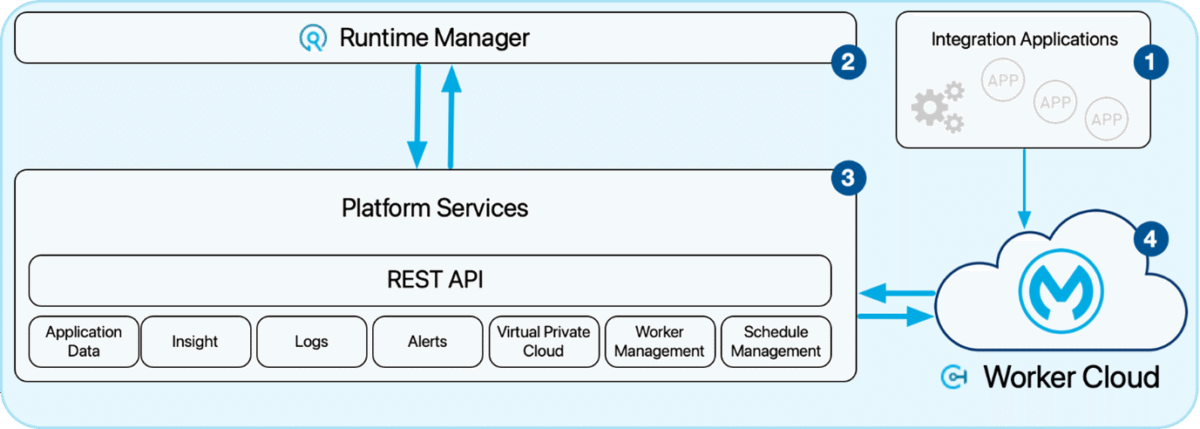
As shown in Figure 1, MuleSoft’s Anypoint Platform provides an end-to-end framework for API-led integration from design and development to monitoring and governance. This architecture illustrates how various components work together to ensure scalability, control, and security across enterprise systems.
Boomi
Boomi is a low-code integration platform with pre-built connectors that simplify integration development, even for users with minimal coding experience. It is a practical choice for organisations seeking speed and agility when building integrations across cloud and on-premises environments. Some of its key features and capabilities include:
- Visual Low-Code Platform: Enables users to design workflows and integrations using a graphical interface, reducing the need for extensive coding knowledge.
- Boomi Enterprise Platform: The unified platform that supports integration development, API management, B2B/EDI integration, Master Data Management (MDM), workflow automation, and data synchronisation in a single ecosystem.
- Runtimes: Integration processes run on lightweight runtime engines that can be deployed either in the cloud or on-premises environments.
- Runtime Clusters and Runtime Clouds: For higher availability and scalability, Boomi supports runtime clusters (grouped runtimes working together) and runtime clouds, which provide managed runtime environments for enterprise-scale integrations.
- Event Streams: Boomi also offers an event streaming capability that enables asynchronous messaging and event-driven integrations, similar to messaging services such as Azure Service Bus or RabbitMQ. This allows organisations to build scalable, real-time integration architectures.
Boomi supports ITIL Service Operation by enabling organisations to monitor integrations, manage incidents, and optimise live services. ITIL practices such as Change Management and Continual Improvement introduce structured governance, ensuring integration updates follow controlled and repeatable release processes.
Boomi’s monitoring and alerting capabilities also support ITIL Problem Management, allowing teams to detect integration issues, analyse root causes, and implement improvements. This helps organisations improve reliability and maintain consistent service performance over time.
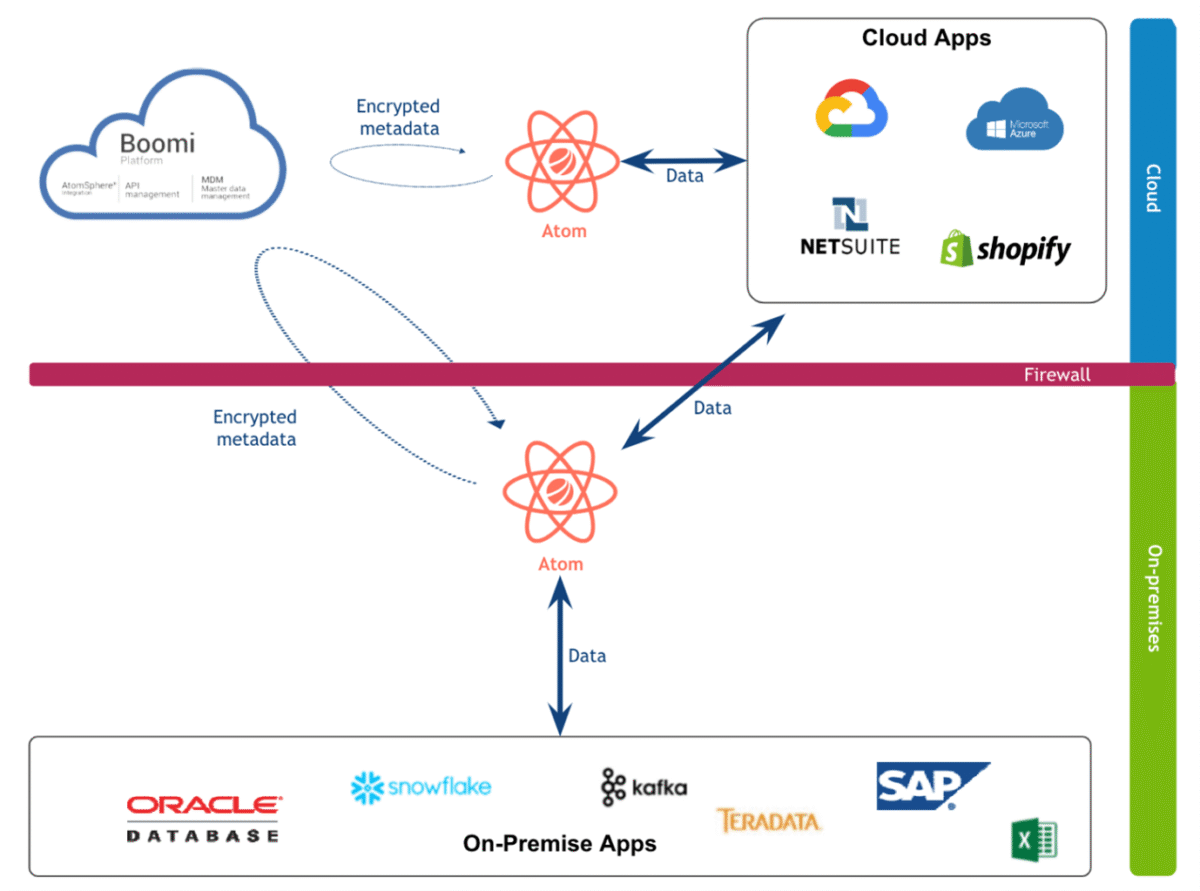
As shown in Figure 2, Boomi’s architecture uses a central cloud-based control plane that manages distributed runtimes across different environments. These runtimes execute integration processes while the platform provides centralised monitoring, governance, and deployment management. This architecture simplifies integration deployment and monitoring while maintaining flexibility across cloud and on-premises systems.
Microsoft Azure Integration services
Microsoft Azure Integration Services offers a mix of code-based and visual workflow tools, allowing both developers and non-developers to build integrations efficiently. Key features of Azure Integration include:
- Logic Apps: A visual workflow designer that allows teams to automate integrations and business processes with minimal coding. This supports ITIL Service Design by enabling structured workflow creation and documented integration logic before deployment.
- Service Bus: An enterprise messaging service that enables reliable asynchronous communication between distributed systems. It aligns with ITIL Service Operation and Availability Management by ensuring resilient and reliable message delivery between services.
- Event Grid: Supports event-driven architecture by routing events from multiple sources to subscribed services in real time. This complements ITIL Event Management by enabling efficient detection and response to system events.
- DevOps Integration: Native integration with Azure DevOps and GitHub enables CI/CD pipelines, automated testing, and version control. This supports ITIL Change Enablement and Release Management by ensuring controlled, traceable deployment of integration updates.
Azure’s real strength lies in its ability to operate across hybrid and multi-cloud environments, connecting on-premises systems with modern SaaS applications. Here, ITIL practices such as Release Management, Configuration Management, and Continual Service Improvement provide structure and discipline. By aligning Azure Integration Services with ITIL, teams can manage integrations as ongoing services rather than one-time deployments. Azure’s built-in observability through Azure Monitor and Application Insights supports ITIL’s Service Measurement and Reporting, enabling data-driven improvements to integration reliability and performance.
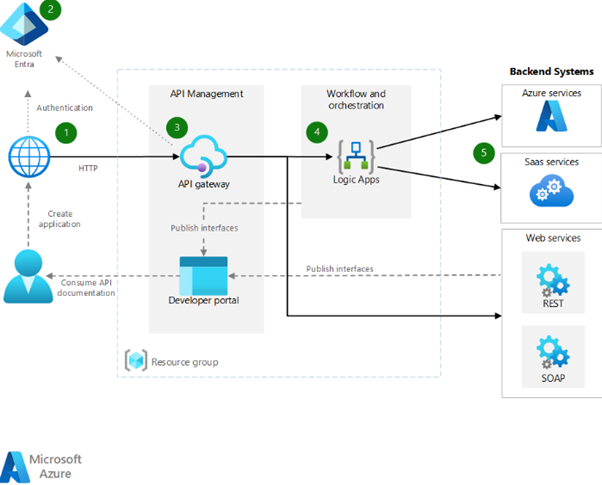
Figure 3 shows the Azure Integration Services architecture, where API Management handles authentication and traffic through the API gateway. Logic Apps orchestrate workflows that connect to various backend systems such as Azure, SaaS, REST, and SOAP services. It showcases how applications interact securely and efficiently through centralized API and workflow management.