






At a glance
- Access your Databricks workspace or create a trial account.
- Create a notebook and choose your preferred language.
- Confirm that serverless compute is available.
- Run a simple command and review the output.
- Use the working environment to explore more Databricks features.
Getting your Databricks setup right from the start makes it easier to learn the platform, explore its features and run some code. This blog covers the basics, including creating an account, accessing your workspace and getting everything ready to run your first notebook.
Whether you’re a developer, analyst or engineer working with data, these steps set the foundation for using Databricks effectively.
This guide is written from a graduate perspective. It is not a complete technical deep dive, but a beginner walkthrough to help you get your first piece of code running in Databricks.
What is Databricks?
Databricks is a cloud platform that brings data engineering, analytics and artificial intelligence into one environment.
It can also provide a strong foundation for effective data platform modernisation.
Founded by the creators of Apache Spark, Databricks provides a unified platform for processing data, running code and collaborating through notebooks. It gives data engineers, analysts and data scientists a shared environment for working with the same data and workflows.
The platform suits organisations of different sizes, from start-ups to large enterprises. It is particularly useful for teams working with large or complex datasets that cannot be processed efficiently on a single machine.
Key concepts to know
Before getting started with the setup, there are a few building blocks you will interact with straight away.
Workspace
The workspace is your main environment in Databricks. It is where your notebooks, folders and other assets are located, and where you organise and access your work.
Compute (serverless)
Compute is needed for code to run. This can be provided through several options, including serverless compute, clusters and SQL warehouses. By default, serverless compute is often used, meaning the platform automatically manages the underlying resources so you do not need to create or start clusters manually.
Notebook
A notebook is where you write and run code, such as SQL or Python. Notebooks are also where you can view the resulting outputs.
Data and Catalog
Databricks uses a catalog system to organise and manage data. Unity Catalog structures data into catalogs, schemas and tables, making it easier to find, access and manage information.
It also supports a more consistent approach to data governance and quality.
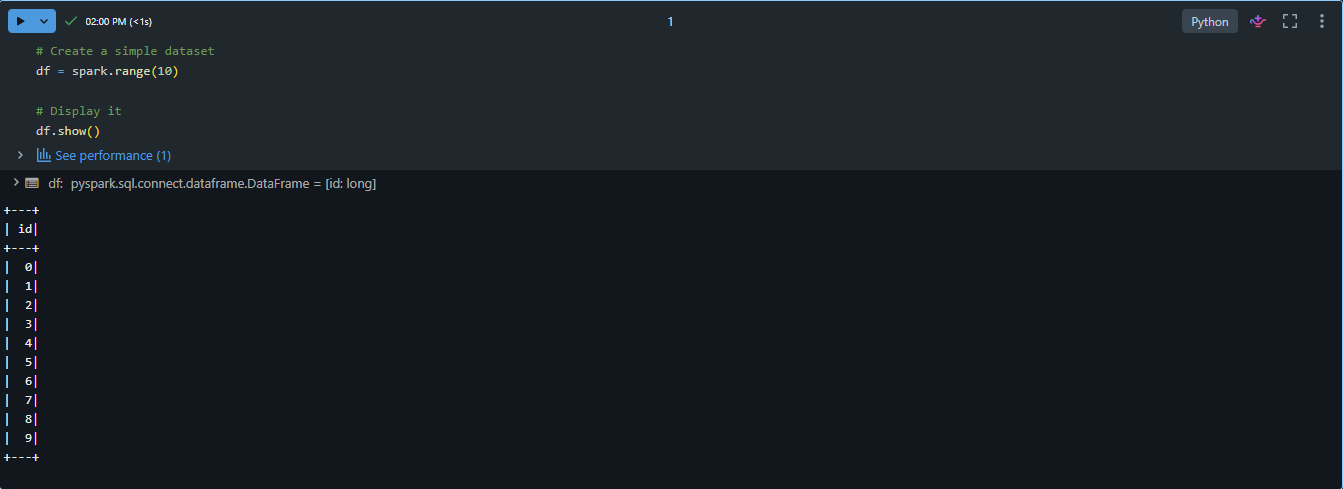
Run your first command
Let’s start with something simple.
print(“Hello, Databricks!”)
Run the cell using the play button beside the command. The output should appear directly underneath the code.
This confirms that the command ran successfully and that your notebook and compute are working correctly.
Conclusion
Setting up Databricks is a simple but important first step when working with data on the platform. By following these steps, you now have a working environment where you can run code and start exploring how Databricks works in practice.
At this stage, the goal is not to understand everything. It is to become comfortable with the basics.
Once that foundation is in place, learning more advanced features becomes easier.
Next steps
Now that your Databricks environment is set up, you can explore:
- Loading and working with real datasets.
- Writing SQL and PySpark queries.
- Exploring practical data analytics use cases.
- Building simple data pipelines.
- Running scheduled jobs and workflows.
- Connecting to external data sources.
Author note: This article was originally written by Damian Fraser during his time at Adaptiv and has been reviewed and published by the Adaptiv team.