

Make Use of Environment Extensions and Avoid Unnecessary Hardcoding
Time and again we see developers that hardcode all their values inside their Boomi processes. While hardcoding has its place, it can often introduce challenges where even a small change in Production triggers a full development cycle. This involves a developer having to first update the Boomi process, package and redeploy it, test it and then navigate change management to get it redeployed to Production.
Instead, any values that are likely to change should be configured as part of a Boomi Cross Reference table or extendible process property during development. By correctly externalising these values, support teams can update them directly through Boomi Environment Extensions in Production, avoiding many of the traditional steps that typically accompany change management. This approach dramatically reduces effort and speeds up issue resolution time by allowing for the separation of operational concerns from implementation logic.
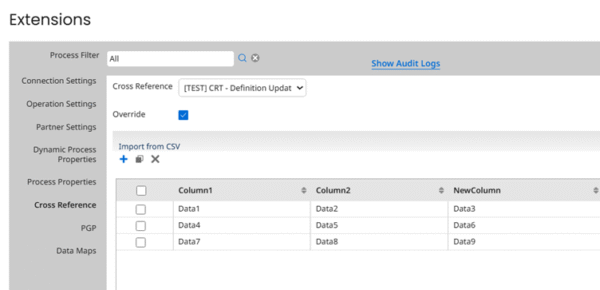
Figure 1 Updating a Cross Reference Table in Boomi Environment Extensions
Use Document Tracking
Boomi’s Process Reporting is a useful tool, but its usefulness depends on how well you configure your processes to leverage its built-in capabilities. One way in which Process Reporting capabilities can be greatly improved is through adding Document Tracking to your Boomi Connector Operations. By tracking meaningful identifiers (e.g. order numbers) you can effectively leverage Process Reporting to track down specific process executions for analysis. This is particularly helpful in cases where you are given a particular identifier and asked to see ‘what went wrong’. It also allows you to verify if Boomi ever actually received and processed the data in the first place.
It’s important to note however, that not all Document Tracking is useful. There are best practices when it comes to Document Tracking that should be followed to get the most out of it. It’s certainly not fun getting a timeout or connection error in your Boomi process and then seeing the dreaded ‘failed tracking documents’ error popping up in Process Reporting. This not only looks ugly but also obscures the true error from being visible to the Operations team.
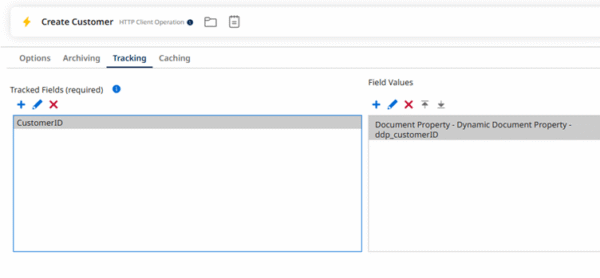
Figure 2 Configuring a tracked field using a Dynamic Document Property
Log With Purpose
Adding logging to your processes is great but make sure to log with purpose and only log the data that really matters. If you log too much data, it can become confusing to look at and obscure the Operations team from seeing the data that matters. Alternatively, not logging enough data can be a hinderance to the Operations team and stop them from being able to see the true cause of an error.
Effective logging is about context and should enable you to find out what data was being processed when the failure occurred and where the failure occurred within the process flow. Common examples of data that is useful to log includes logging the Last Successful Run Date value the process used when executing, and any unique identifiers that are key to the process. In some circumstances it is also useful to log request payloads but be careful in doing this that you’re not logging confidential information. You should also be wary that Boomi will truncate log data that is too long.
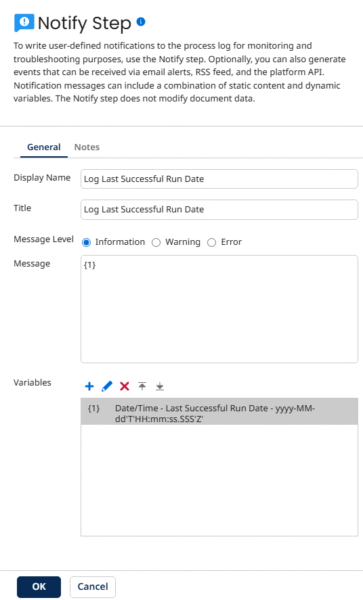
Figure 3 Logging the Boomi Last Successful Run Date
Make Your Processes Readable
When designing and developing your processes you should make them easily readable. This reduces the time it takes the Operations team to work through issues when troubleshooting your process. Assume when developing that you are not going to be the person supporting the process, and label and name your process components according to a ‘Salesforce to ADMS Create Outage’ to indicate the integration’s source, target, action and entity. Make use of Boomi’s Notes feature and add notes to your process components and your process itself, and reuse common subprocesses and process components where possible.
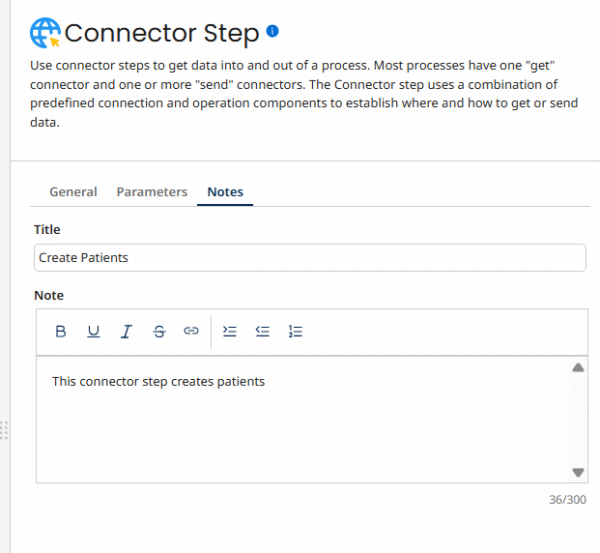
Figure 4 Adding notes to a Boomi Connector Step
Design Processes with Failure in Mind
For every process, it’s not a matter of if it will fail, but when. All processes will experience failure at some point, but it’s how that process recovers from failures that makes or breaks it.
As such, you should always aim to design your processes with failure in mind by thinking about what the likely points of failure are, considering how can things be rerun, and understanding what the impact will be if some data is lost or duplicated.
A process that is designed well should allow documents to be rerun as required, minimising the amount of data that is processed as duplicates. Quite often this means giving the process the ability to rerun individual documents one at a time, instead of forcing the process to rerun the entire batch. One of the easiest ways to allow processes to rerun only errored documents is to make use of the Boomi Start Step to rerun errored documents using Boomi Process Reporting Operations teams can use this feature without fear of duplicate processing and with no specialist knowledge of the integration process required.
For some integrations, duplicate processing may not be a problem, but you still need an easy and reliable way to rerun the process when there is a failure. Depending on the process, you may be able to do this by simply utilising the built-in Boomi Last Successful Run Date. This allows you to automatically rerun processes from point of failure without having to even change anything.
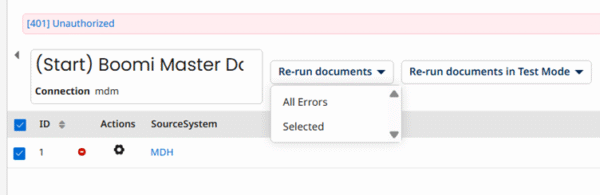
Figure 5 Rerunning a document from the Start step